
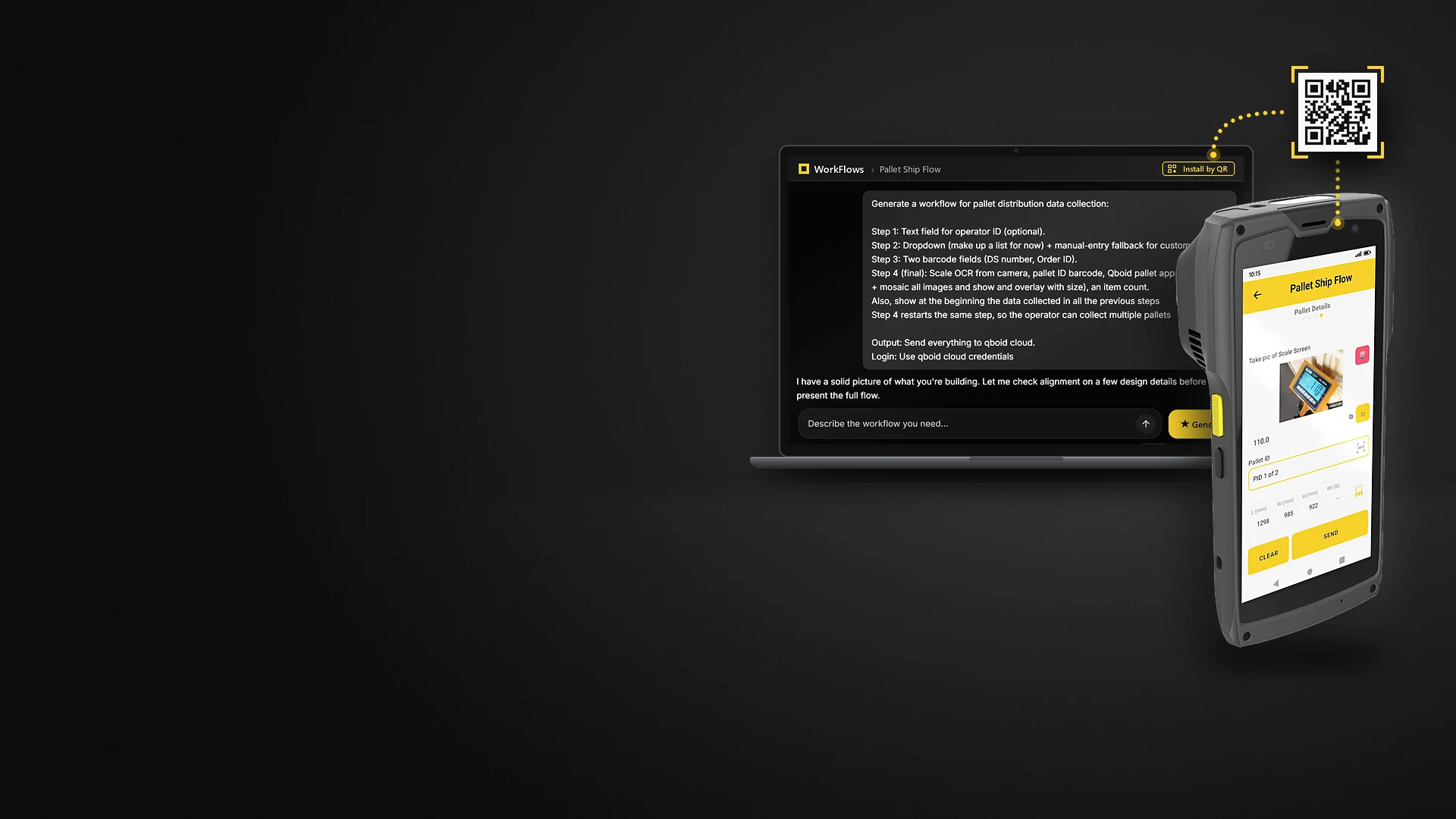
App · runs on the M2
WorkFlows AI app builder for warehouse data capture
Describe the workflow. Get a native Android app. Install it by QR code.
WorkFlows turns a plain-English description of your process into an app on your devices, without a development project. We build the first app with you in a call; your team keeps it going.
- First app
- In one callcomplex apps within 24 hours
- Install
- QR codeor through your MDM
- On the device
- Native Androidsigned, works offline
- Data goes to
- Your systemsWMS, ERP, TMS, email, Sheets, QBOID Cloud
How it works
Describe, publish, scan, live.
From a description to an app on the warehouse floor, in four steps and one meeting.
Write what the operator should do, casually or in detail. The agent plans the app and points out missing steps before it builds anything.
WorkFlows assembles the app from tested modules: fields, scans, photos, M2 dimensions, scales, logic and outputs.
Each device installs the app by scanning a QR code, or you roll it out through your MDM.
Operators use it the same day. Records go straight to your systems; changes reach devices over the air, with no rebuild.
From a description to a pallet app
The launch video: describe a workflow, deploy it by QR code, and process LTL pallets with the M2.
Old way vs WorkFlows
Months of scoping, or one meeting.
Most apps are finished during the call. Apps with complex logic or a new integration are usually ready within 24 hours.
| Topic | Custom development | WorkFlows |
|---|---|---|
| Steps | Scoping, procurement, approval, build, deployment | Describe it in a meeting, publish, scan the QR code |
| Time to first app | Months | Most apps during a single call; complex ones within 24 hours |
| Changes | A new release cycle | Edit the workflow; devices update over the air |
| What runs on the device | Code written for the project | A signed native app assembled from audited, version-pinned modules |
| Who maintains it | Developers or an agency | Your operations or IT team; we build the first app with you. Need help later? We get on a call and update the app in minutes. |
What an app can capture
Measure more than the M2 can.
Add calipers below its range, tape measures above it, any scale with a display, and connect to other supported hardware. Name what you need in the description.
Barcodes
1D and 2D, from the device scanner.
Photos
Single photos, sets and image mosaics; damage markers.
M2 dimensions
Launch the Item & Parcel or Pallets app and get the result back.
Weight
Bluetooth scales, or any scale read from a photo of its display.
Text from labels
Read address labels and scale readouts from a photo.
Calipers
Bluetooth digital calipers for parts too small for the Item & Parcel app on the M2.
Tape measures
Bluetooth tape measures, such as Reekon and CubeTape, for freight too long for the Pallets app on the M2.
Fields, logic and labels
Text, numbers, lists, yes/no checks, conditions, label printing.
Where the data goes
Straight to your systems.
Each app sends its records from the device to the destinations you set.
Built for IT
Safe to roll out.
- Native, signed Android app that works offline
- Assembled only from audited, version-pinned modules; no AI-generated code runs on devices
- Over-the-air workflow updates; rollout through MDM; kiosk mode
- Sign-in with Google SSO, OAuth 2 or local credentials; audit log
- Data goes from the device to your systems, not through a third-party store
Example apps
Built in a call, in use on the floor.
Each one can be rebuilt from a short description.
Dimensions + weight → QR code
Measure and weigh an item, then show the result as a QR code for another system to scan. Once a custom engineering project; rebuilt in minutes.
Shipment capture → email
Barcode, M2 dimensions and photo, scale reading and address label read from photos, sent as a formatted email.
Any size → one record
Calipers for tiny parts, the Item & Parcel app on the M2 for cartons, a Bluetooth tape for long freight and a photo of the scale for the weight, on one capture screen.
See one running
Package Push, a WorkFlow for NetSuite.
Pallet data into NetSuite in one scan
- Scan the Item Fulfillment's barcode; the app finds it in NetSuite and lists the packages already on it
- Measure the pallet with the Pallets app
- Photograph the scale display; the weight is read from the photo
- Density, freight class and NMFC are worked out, with dimensions rounded up to whole inches as carriers bill them
- One tap adds the package to the fulfillment in NetSuite
Results so far
Anonymous, from early customers.
Delivery company
TMS integration in one call
After a pilot with the M2 for parcels and pallets, the company needed the data in its TMS format. WorkFlows learned the format and the integration was finished during one 30-minute call.
Cosmetics eCommerce seller
Six workflows in about 10 days
Six custom workflows with database lookups and integration took about 10 days, against an estimated 3 months of Android development, while the specs kept changing.
Example
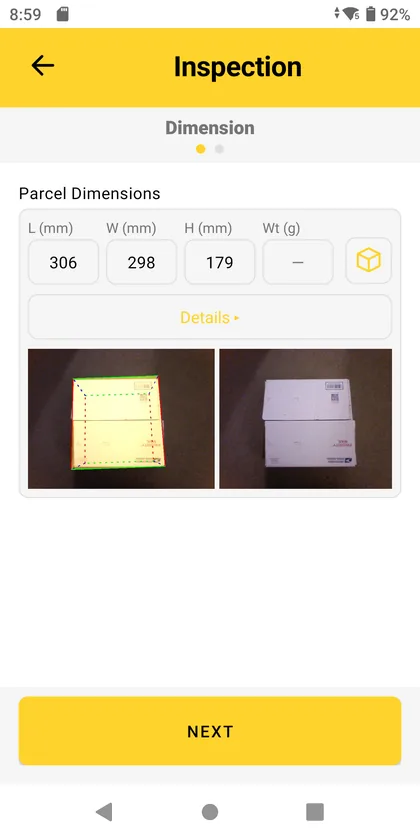
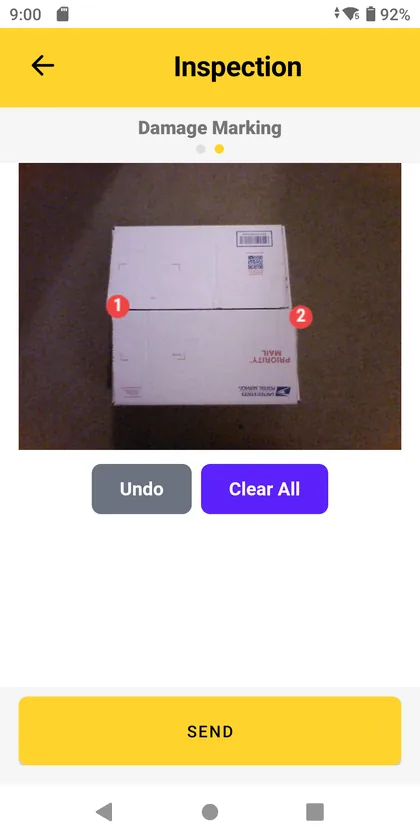
A parcel inspection app, from one paragraph.
The prompt a sales engineer typed, and the two screens the operator gets.
The resulting app
- Sign in with the team's QBOID Cloud account
- Measure the parcel with the Item & Parcel app: dimensions and photos come back into the workflow
- Tap the photo to mark each damaged spot with a numbered marker, with Undo and Clear All
- Send: the dimensions and the marked photo go to QBOID Cloud, ready for a claim
Three rounds in the builder: build the marking screen, polish the markers, fix how two-digit numbers print on the saved photo.
For integrators and resellers
Build the first release. Keep the relationship.
Build the first release for your customer, hand it over, and stay involved for the next workflow and the next site.
WorkFlows gives system integrators and consultancies a fast way to deliver warehouse data capture on the M2 without an Android project. Your customer's team maintains the app.
FAQ
WorkFlows questions
Who builds the app?
We build the first one with you in a call. After that your team keeps it going: change a step, add a field or build the next app yourselves, or ask us or your integrator to help.
How long does it take?
Most apps are finished during the call. Apps with complex logic or a new integration are usually ready within 24 hours.
Is the app written by AI?
No code is generated for the device. The agent plans the app with you and assembles it from tested, version-pinned modules that engineers have reviewed. It also points out steps or details that are missing before it builds.
Does it work offline?
Yes. The app is a native, signed Android app that runs on the device. Records are sent when the device is connected.
Where does the data go?
Straight from the device to the destinations you choose: your WMS, ERP or TMS, any HTTPS endpoint, email, Google Sheets or QBOID Cloud. Operator data isn't stored in a third-party cloud on the way.
How do we roll it out and update it?
Devices install an app by scanning a QR code, or through your MDM. Changes to a workflow reach devices over the air, with no app rebuild.
Can it use the M2's dimensioning?
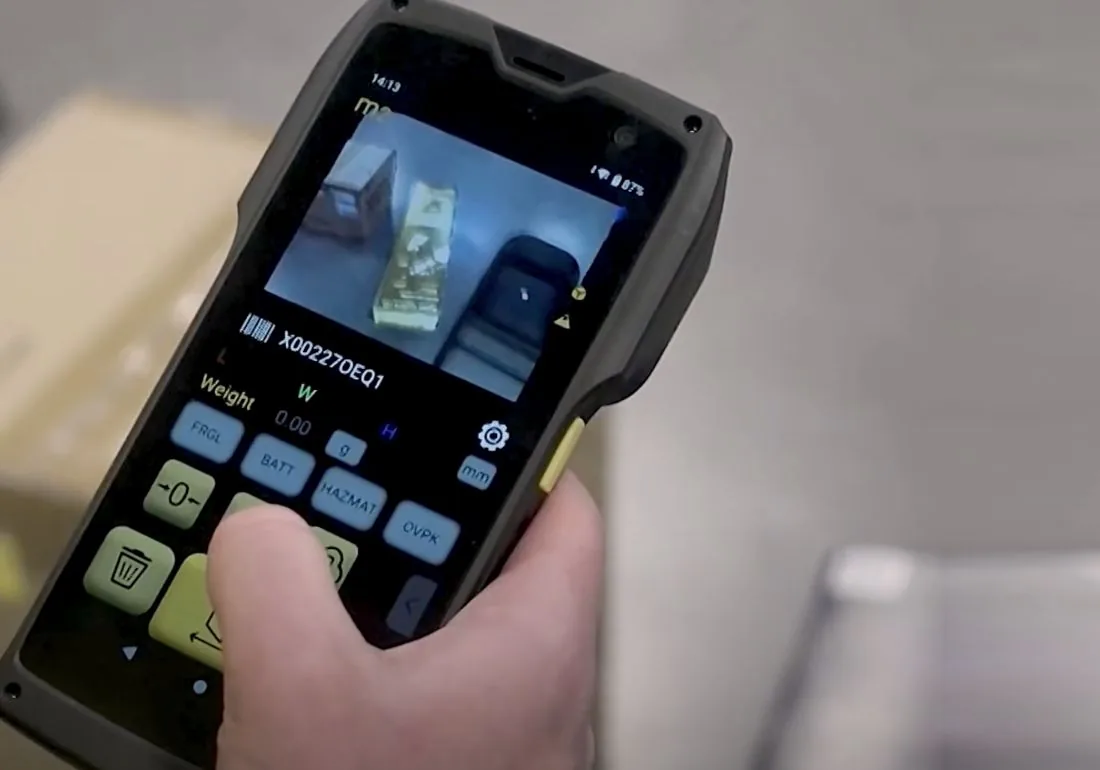
Yes. A WorkFlows app can launch the Item & Parcel or Pallets app and bring the dimensions and photos back into its own record.
Who makes WorkFlows?
WorkFlows is QBOID's product, built on technology from XFlows and supported by QBOID.
How is it licensed?
WorkFlows is an annual license per device, on the QBOID store ↗; for several devices, ask sales for a quote.
Book a demo · Get in touch
Bring one process to the demo.
Tell us a process you'd like on the M2 and we build a first version of it with you. Or leave your details and sales will follow up.
- Demo: about 20 minutes, remote, on a workflow you choose
- Or leave your details: sales replies within one business day
- Ships to all US states; resellers in North and South America, EMEA and APAC
Or write to [email protected], or call +1 (408) 419-1449.