
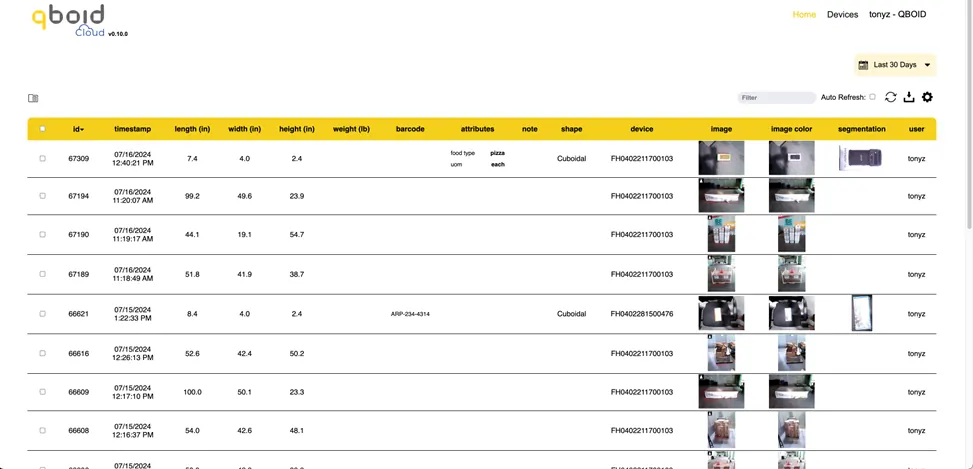
Basic data dashboard · included with every app license
QBOID Cloud
Every scan, in one place: store, review, export, and pass it on.
QBOID Cloud receives the records your M2 devices upload, with their photos. Review them in a browser, download them, or let your systems pull them by API. Use it as a short- or long-term bridge to your WMS.
- Basic
- Freewith any app license
- Pro adds
- REST APIplus auto refresh and data edits
- Export
- XLS or ZIPthe ZIP includes the photos
- Region
- US or EUchosen at sign-up; hosted on AWS
What it does
Store. Review. Export. Connect.
A table of every scan from every M2 on the account, with dimensions, weight, barcode, shape and photos.
Store
Every scan from every M2, with its three photos, synced in real time.
Review
View and filter records by date, device, custom attribute or barcode in any browser, and open the photos behind each measurement.
Export
Download a date range as XLS, or as a ZIP with the images.
Connect
Pull records into other systems with the REST API (Pro).
Plans
Basic or Pro.
The Basic version is free with any app license. The Pro version adds the API, auto refresh and data edits. A Pro subscription is on the store, and one license covers your entire fleet of M2s.
| Feature | Basic | Pro |
|---|---|---|
| How you get it | Free, with any app license | Annual license for all your M2s |
| Scans and photos in a browser | Yes | Yes |
| Filter and export (XLS, ZIP) | Yes | Yes |
| History | Up to 30 days, rolling | Unlimited while Pro is active |
| Storage | Set by the 30-day history | Up to 1,000,000 records or 100 GB |
| REST API | — | Yes |
| Auto refresh | — | Yes |
| Data edits | — | Yes |
| High-resolution and PNG images, folders | — | Yes |
| Support | Reasonable effort | First response within one business day (Mon–Fri) |
A bridge to your WMS
Start measuring before the integration is done.
Use QBOID Cloud on its own, or for as long as you need it while the WMS integration is built.
- 01
Day one
The M2 sends every scan to QBOID Cloud. Teams review and export from the browser.
- 02
Integration ready
Point the M2 at your WMS, ERP or TMS endpoint, or pull from QBOID Cloud with the Pro API.
- 03
Long term
Keep QBOID Cloud as the photo archive and audit trail, or switch it off.
M2 how-to, step 4: connecting to the Cloud
Set up a Basic account, add an M2 by scanning a QR code from the browser, and see its scans arrive.
FAQ
QBOID Cloud questions
Do we need QBOID Cloud to use the M2?
No. All processing happens on the M2, which works fully offline and saves every scan on the device. QBOID Cloud is one destination for the records; your own systems are another, and you can use both.
What does Basic include, and what does Pro add?
Basic is free with any app license: your scans in a browser, filters and XLS or ZIP export, with a rolling 30-day history. Pro adds the REST API, auto refresh and data edits, with history kept for as long as Pro is active.
Where is the data stored?
On AWS, in the region you choose when you sign up: US or EU. Data stays in that region. EU-region operational data is not transferred to the United States.
Who owns the data?
You do. QBOID doesn't sell operational data and can't access the data on your devices remotely.
How do devices connect?
Create an account, then add each M2 by scanning a QR code in the app. The M2 uploads each record with its photos as JSON over HTTPS. The connecting video shows each step.
Can we move to our WMS later?
Yes. Start with QBOID Cloud, then point the M2 at your WMS, ERP or TMS once that integration is ready. Cloud can keep a copy, or you can switch it off.
How is it licensed?
Basic comes free with any app license. Pro is an annual license that covers all your M2s and their uploads to the Cloud. Buy it on the QBOID store ↗, or ask sales for a quote.
Book a demo · Get in touch
See your scans in QBOID Cloud.
Book a 20-minute remote demo: we measure a few of your items and show the records, photos and exports in the Cloud. Or leave your details and sales will follow up.
- Demo: about 20 minutes, remote, on items you choose
- Or leave your details: sales replies within one business day
- Ships to all US states; resellers in North and South America, EMEA and APAC
Or write to [email protected], or call +1 (408) 419-1449.